> ## Documentation Index
> Fetch the complete documentation index at: https://docs.codealive.ai/llms.txt
> Use this file to discover all available pages before exploring further.
# AI Code Review
> Automated intelligent code reviews for every pull request
## Overview
CodeAlive AI Code Review automatically analyzes your pull requests, providing comprehensive feedback on code quality, security, performance, and best practices. Get instant, consistent reviews that help your team ship better code faster.
## Key Features
Reviews trigger automatically on PR creation and updates
Support for 19+ programming languages
Configure review agents for specific concerns
Maintain coding standards across your organization
## Getting Started
Choose your version control platform:
Navigate to **Providers → GitHub** in your CodeAlive dashboard
Navigate to **Providers → GitLab** in your CodeAlive dashboard
Set up your review preferences in the PR Reviews section
CodeAlive will automatically review new PRs and updates
## GitHub Integration
### Installing the GitHub App
Navigate to **Providers → GitHub** in your CodeAlive dashboard
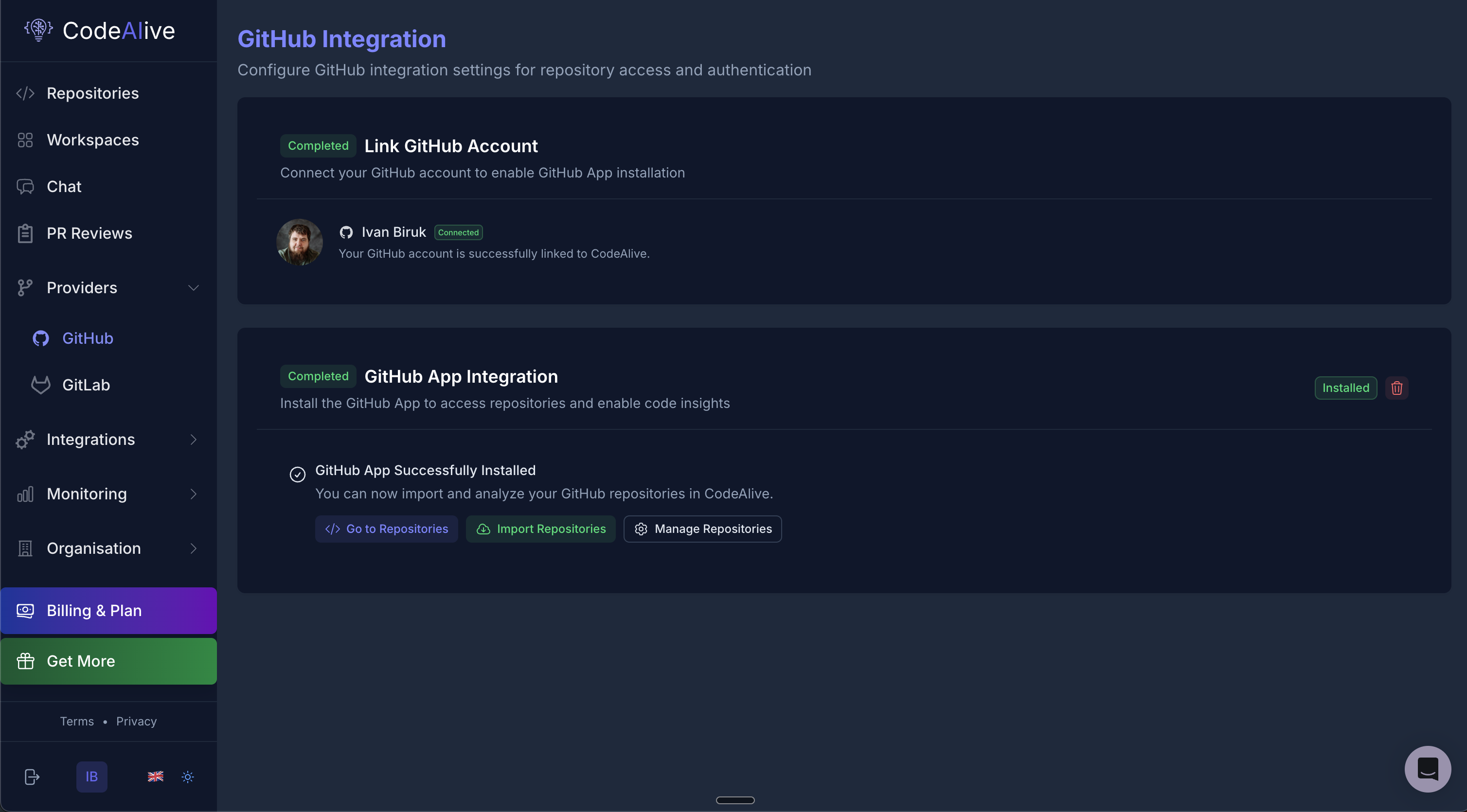 1. Click **"Install GitHub App"**
2. You'll be redirected to GitHub
3. Select your organization or personal account
4. Choose repository access:
* **All repositories** - Recommended for organization-wide coverage
* **Selected repositories** - Choose specific repositories
1. Review the requested permissions
2. Click **"Install & Authorize"**
3. You'll be redirected back to CodeAlive
4. The status will show **"GitHub App Successfully Installed"**
Once connected:
* Click **"Import Repositories"** to add repos for indexing
* Select the repositories you want to review
* Wait for initial indexing to complete
## GitLab Integration
### Setting Up GitLab Access
In GitLab:
1. Go to **User Settings → Access Tokens**
2. Create a new token:
* **Name**: CodeAlive
* **Expiration**: Set as needed
* **Scopes**: Select `api` and `read_repository`
3. Copy the generated token
1. Navigate to **Providers → GitLab** in CodeAlive
2. Paste your Personal Access Token
3. Click **"Token Set"**
1. Click **"Install GitHub App"**
2. You'll be redirected to GitHub
3. Select your organization or personal account
4. Choose repository access:
* **All repositories** - Recommended for organization-wide coverage
* **Selected repositories** - Choose specific repositories
1. Review the requested permissions
2. Click **"Install & Authorize"**
3. You'll be redirected back to CodeAlive
4. The status will show **"GitHub App Successfully Installed"**
Once connected:
* Click **"Import Repositories"** to add repos for indexing
* Select the repositories you want to review
* Wait for initial indexing to complete
## GitLab Integration
### Setting Up GitLab Access
In GitLab:
1. Go to **User Settings → Access Tokens**
2. Create a new token:
* **Name**: CodeAlive
* **Expiration**: Set as needed
* **Scopes**: Select `api` and `read_repository`
3. Copy the generated token
1. Navigate to **Providers → GitLab** in CodeAlive
2. Paste your Personal Access Token
3. Click **"Token Set"**
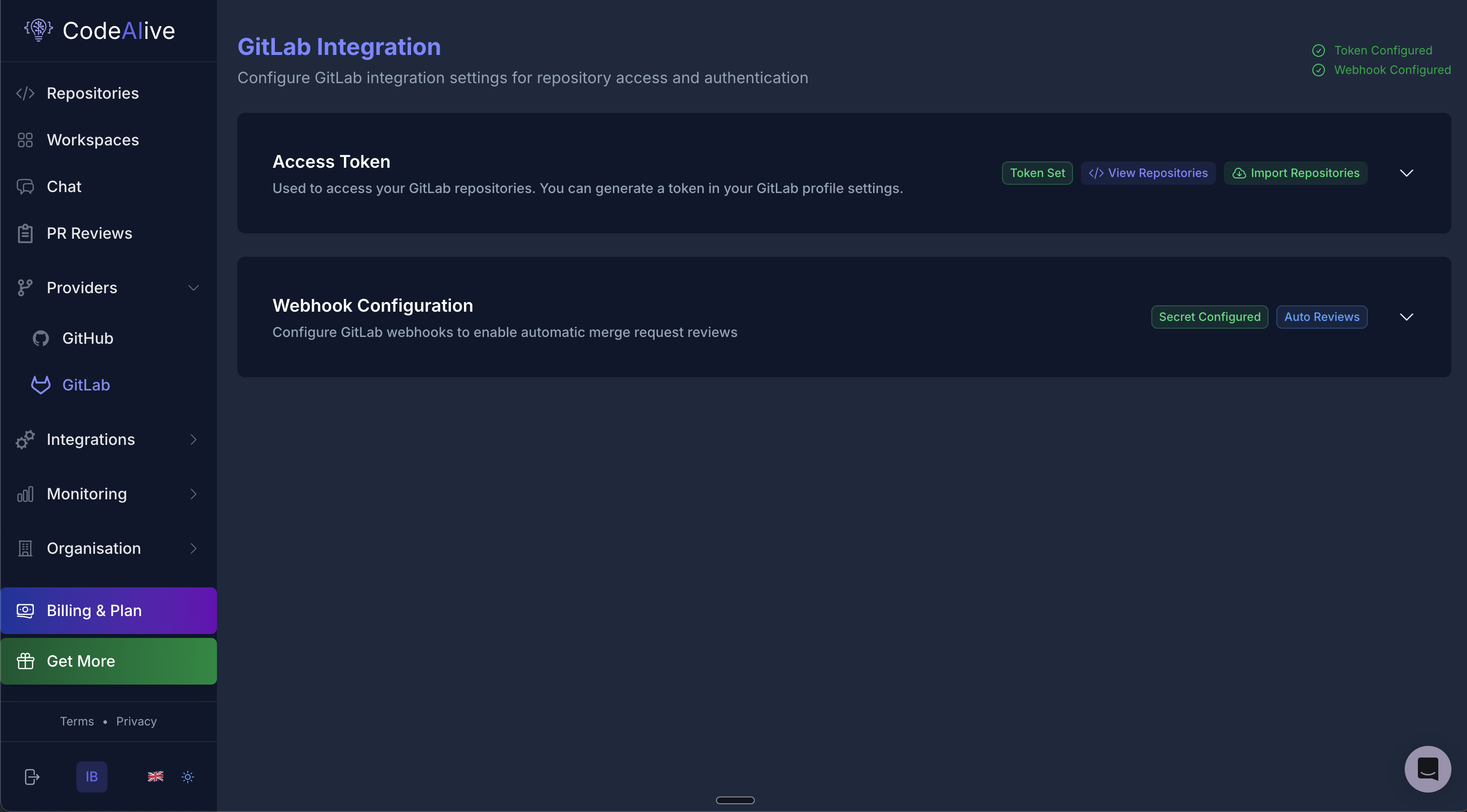 Configure GitLab webhooks for automatic reviews:
1. Copy the webhook URL from CodeAlive
2. In your GitLab project:
* Go to **Settings → Webhooks**
* Add the CodeAlive webhook URL
* Select triggers:
* Merge request events
* Comments
3. Click **"Secret Configured"** in CodeAlive
* Click **"Import Repositories"**
* Select GitLab projects to analyze
* Complete the setup
## Review Configuration
### Customizing Review Behavior
Access review settings by clicking **"Repository Review Configuration"** in the PR Reviews section.
Configure GitLab webhooks for automatic reviews:
1. Copy the webhook URL from CodeAlive
2. In your GitLab project:
* Go to **Settings → Webhooks**
* Add the CodeAlive webhook URL
* Select triggers:
* Merge request events
* Comments
3. Click **"Secret Configured"** in CodeAlive
* Click **"Import Repositories"**
* Select GitLab projects to analyze
* Complete the setup
## Review Configuration
### Customizing Review Behavior
Access review settings by clicking **"Repository Review Configuration"** in the PR Reviews section.
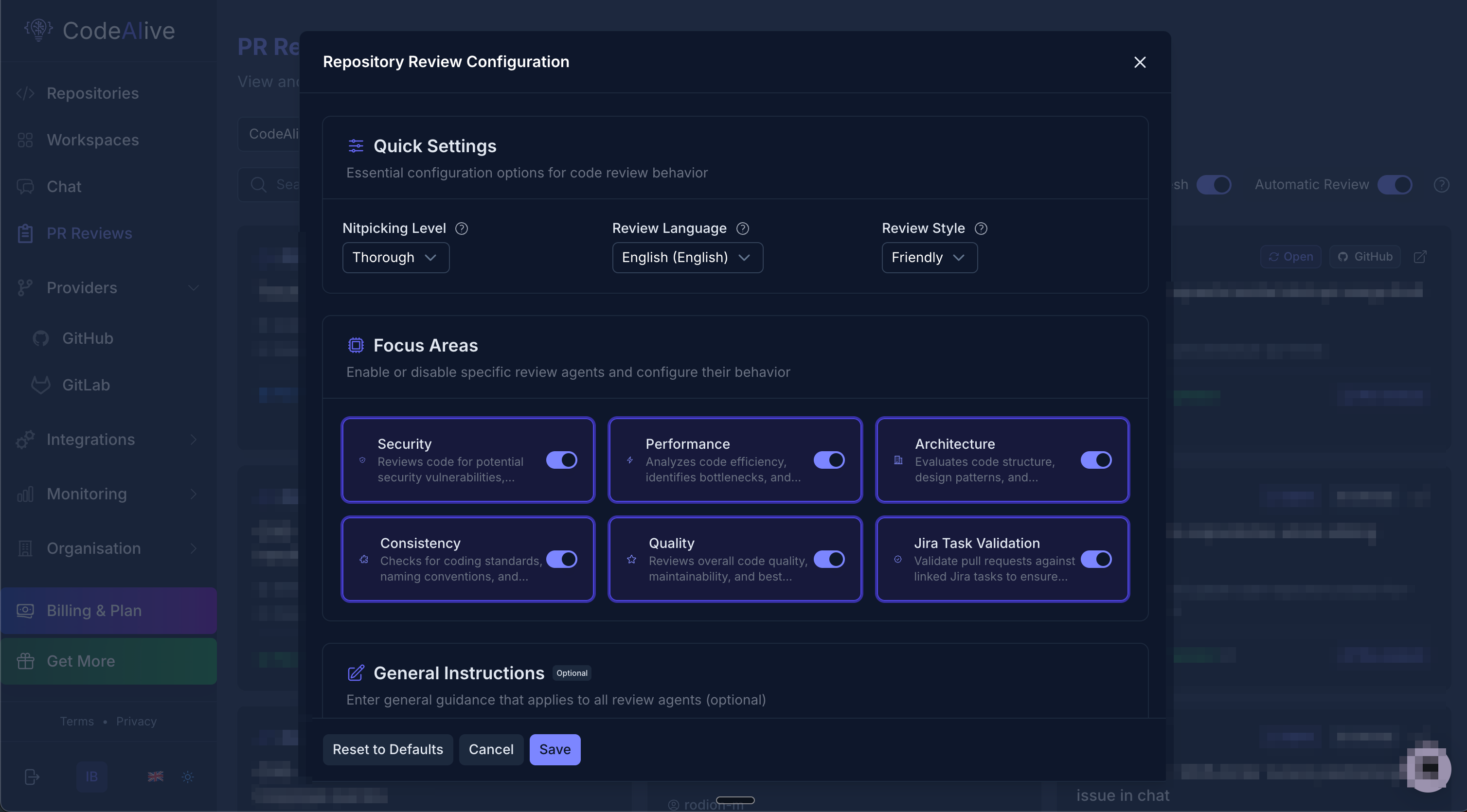 ### Quick Settings
Control the detail level of reviews:
* **Minimal (1)**: Critical issues only
* **Basic (2)**: Important problems
* **Balanced (3)**: Comprehensive review (recommended)
* **Detailed (4)**: Include minor issues
* **Thorough (5)**: Every possible improvement
Choose the language for review comments:
* English (default)
* Spanish
* French
* German
* Japanese
* Chinese
* And many more...
This setting controls the language of the review feedback, not the programming languages supported.
Choose the tone of feedback:
* **Professional**: Formal, technical feedback
* **Friendly**: Approachable and encouraging
* **Constructive**: Balanced with suggestions
* **Direct**: Straight to the point
### Focus Areas
Enable or disable specific review agents:
Reviews code for potential security vulnerabilities, authentication issues, and data exposure risks
Analyzes code efficiency, identifies bottlenecks, and suggests optimizations
Evaluates code structure, design patterns, and architectural decisions
Checks for coding standards, naming conventions, and style consistency
Reviews overall code quality, maintainability, and best practices
Validates pull requests against linked Jira tasks to ensure requirements are met
### General Instructions
Add custom guidelines that apply to all review agents. This is useful for:
* Team-specific conventions
* Project requirements
* Domain-specific rules
* Compliance standards
Example:
```
- Follow our team's error handling patterns
- Ensure all API endpoints have proper authentication
- Use TypeScript strict mode conventions
- Include unit tests for new functions
```
## Managing Reviews
### PR Reviews Dashboard
The PR Reviews page shows all pull requests across your repositories:
### Quick Settings
Control the detail level of reviews:
* **Minimal (1)**: Critical issues only
* **Basic (2)**: Important problems
* **Balanced (3)**: Comprehensive review (recommended)
* **Detailed (4)**: Include minor issues
* **Thorough (5)**: Every possible improvement
Choose the language for review comments:
* English (default)
* Spanish
* French
* German
* Japanese
* Chinese
* And many more...
This setting controls the language of the review feedback, not the programming languages supported.
Choose the tone of feedback:
* **Professional**: Formal, technical feedback
* **Friendly**: Approachable and encouraging
* **Constructive**: Balanced with suggestions
* **Direct**: Straight to the point
### Focus Areas
Enable or disable specific review agents:
Reviews code for potential security vulnerabilities, authentication issues, and data exposure risks
Analyzes code efficiency, identifies bottlenecks, and suggests optimizations
Evaluates code structure, design patterns, and architectural decisions
Checks for coding standards, naming conventions, and style consistency
Reviews overall code quality, maintainability, and best practices
Validates pull requests against linked Jira tasks to ensure requirements are met
### General Instructions
Add custom guidelines that apply to all review agents. This is useful for:
* Team-specific conventions
* Project requirements
* Domain-specific rules
* Compliance standards
Example:
```
- Follow our team's error handling patterns
- Ensure all API endpoints have proper authentication
- Use TypeScript strict mode conventions
- Include unit tests for new functions
```
## Managing Reviews
### PR Reviews Dashboard
The PR Reviews page shows all pull requests across your repositories:
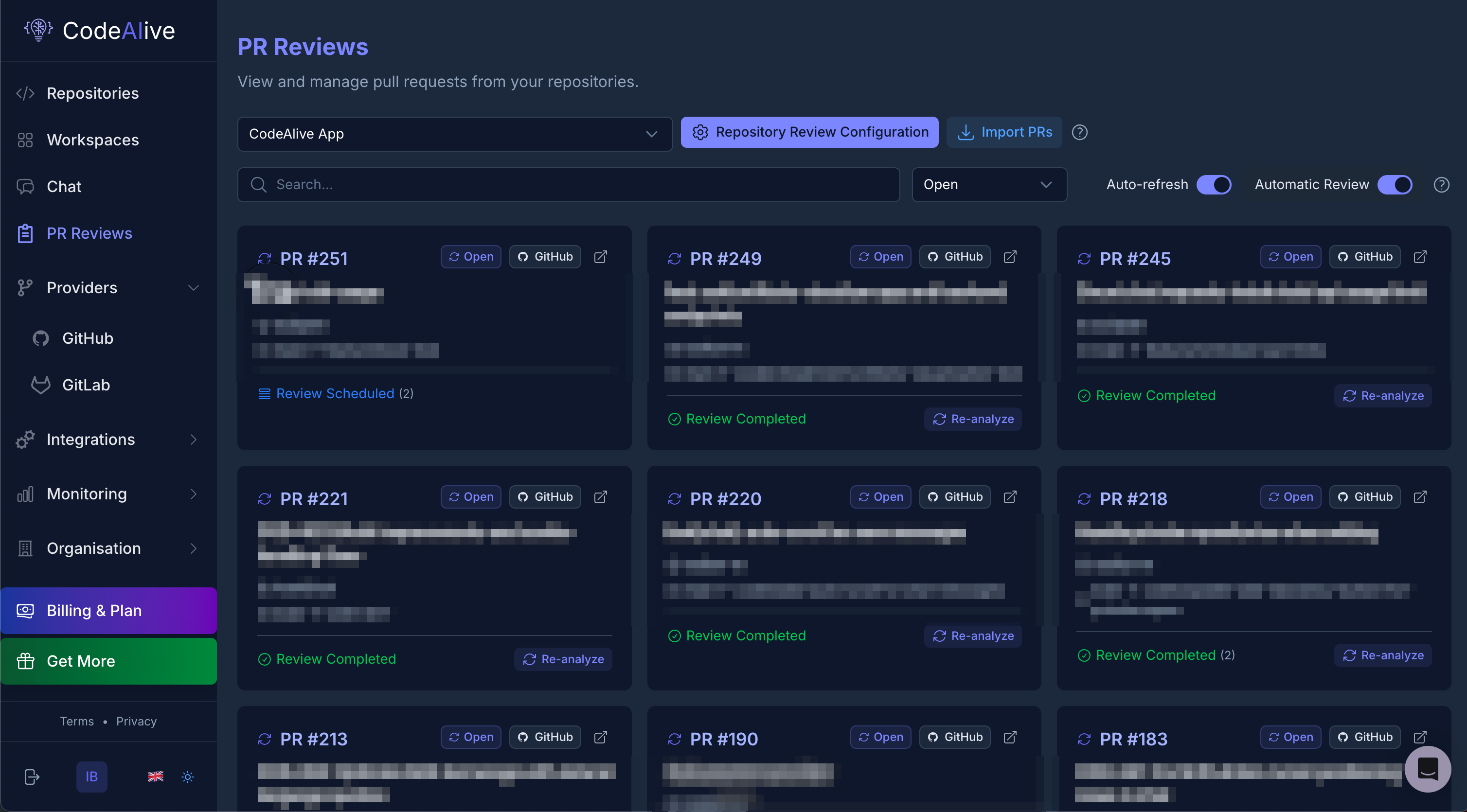 Features:
* **Repository selector**: Filter by repository
* **Import PRs**: Manually import pull requests
* **Auto-refresh**: Keep the list updated
* **Automatic Review**: Toggle automatic reviews on/off
### Review States
Pull requests can have the following states:
* **Review Scheduled**: Queued for review
* **Review Completed**: Review finished successfully
* **Re-analyze**: Request a fresh review
### Triggering Reviews
Reviews can be triggered in multiple ways:
Reviews trigger automatically when:
* A new PR is created
* Commits are pushed to an open PR
* PR is updated or edited
1. Go to PR Reviews page
2. Find your pull request
3. Click **"Re-analyze"**
Add a comment to your PR:
```
/codealive review
```
## Best Practices
Begin with balanced settings (level 3) and adjust based on team feedback
Enable focus areas one at a time to understand their impact
Descriptive PR titles help AI understand context better
Review and refine settings based on team needs
Use general instructions for team-specific rules
Track which suggestions are most valuable
## Troubleshooting
**Check:**
* Automatic Review toggle is enabled
* Repository is properly indexed
* Webhooks are configured (GitLab)
* GitHub App has proper permissions
**Normal duration**: 2-5 minutes depending on PR size
**If longer:**
* Check repository indexing status
* Verify API limits aren't exceeded
* Contact support if persistent
**Verify:**
* All files in PR are in supported languages
* PR isn't too large (>1000 files)
* Repository is fully indexed
* Review configuration is saved
**Steps:**
1. Verify webhook URL is correct
2. Check webhook test in GitLab settings
3. Ensure merge request events are selected
4. Confirm secret token matches
## Related Resources
* [Semantic Code Search](/features/semantic-search)
* [Codebase Chat](/features/codebase-chat)
* [Multi-Repository & Workspaces](/features/multi-repo)
* [API Reference](/api-reference/toolapi/list-visible-data-sources)
* [Getting Started](/quickstart)
* [MCP Integrations](/integrations/mcp)
Features:
* **Repository selector**: Filter by repository
* **Import PRs**: Manually import pull requests
* **Auto-refresh**: Keep the list updated
* **Automatic Review**: Toggle automatic reviews on/off
### Review States
Pull requests can have the following states:
* **Review Scheduled**: Queued for review
* **Review Completed**: Review finished successfully
* **Re-analyze**: Request a fresh review
### Triggering Reviews
Reviews can be triggered in multiple ways:
Reviews trigger automatically when:
* A new PR is created
* Commits are pushed to an open PR
* PR is updated or edited
1. Go to PR Reviews page
2. Find your pull request
3. Click **"Re-analyze"**
Add a comment to your PR:
```
/codealive review
```
## Best Practices
Begin with balanced settings (level 3) and adjust based on team feedback
Enable focus areas one at a time to understand their impact
Descriptive PR titles help AI understand context better
Review and refine settings based on team needs
Use general instructions for team-specific rules
Track which suggestions are most valuable
## Troubleshooting
**Check:**
* Automatic Review toggle is enabled
* Repository is properly indexed
* Webhooks are configured (GitLab)
* GitHub App has proper permissions
**Normal duration**: 2-5 minutes depending on PR size
**If longer:**
* Check repository indexing status
* Verify API limits aren't exceeded
* Contact support if persistent
**Verify:**
* All files in PR are in supported languages
* PR isn't too large (>1000 files)
* Repository is fully indexed
* Review configuration is saved
**Steps:**
1. Verify webhook URL is correct
2. Check webhook test in GitLab settings
3. Ensure merge request events are selected
4. Confirm secret token matches
## Related Resources
* [Semantic Code Search](/features/semantic-search)
* [Codebase Chat](/features/codebase-chat)
* [Multi-Repository & Workspaces](/features/multi-repo)
* [API Reference](/api-reference/toolapi/list-visible-data-sources)
* [Getting Started](/quickstart)
* [MCP Integrations](/integrations/mcp)